
Service desk platform migration signs are easy to miss when you are in the middle of running a busy IT operation. The platform has always had quirks. Workarounds have become second nature. The team knows which buttons to avoid. Staying on the wrong platform has a cost, though. A slow, inflexible, or poorly integrated service desk is not just an IT problem. It is a drag on every team that depends on IT to function.
The seven signs below are the clearest indicators that a platform is no longer serving the operation. Each one comes with a concrete test so you can assess your own environment.
TL;DR
- The clearest service desk platform migration signs: routine changes need a specialist, reporting lives in spreadsheets, self-service adoption is under 20%, integrations need manual bridging, cost grows without more value, agents work around the platform, and there is no AI capability or roadmap.
- Each sign on its own may be fixable. Three or more together point to a platform that has hit its ceiling.
- Use the optimise-versus-replace test: a configuration gap can be fixed in place; a genuine capability limitation cannot.
- Most ANZ mid-market teams find their gap is configuration, not capability, so optimisation is often faster and cheaper than migration.
- On Cherwell? Its end of life is 31 December 2026, so plan early. A structured migration takes eight to twelve weeks minimum.
Not sure whether your platform has a configuration gap or a genuine capability limitation? Book a free diagnostic call and we will give you a straight answer in 30 minutes.
Sign 1: Your Platform Requires a Specialist to Change Anything
If making a workflow change, adding a new ticket category, or updating an SLA policy requires a consultant or a week-long support ticket to the vendor, your platform has outgrown your team's ability to manage it.
Modern ITSM platforms are designed for admin teams, not developers. Configuration changes should be achievable by a trained IT administrator without writing code. When they are not, the platform works against the operation. This dependency compounds over time. Every change that requires specialist involvement is a change that does not happen quickly. The platform falls further behind the organisation's actual needs.
Sign 2: Your Reporting Is Built in Spreadsheets Outside the Platform
If your weekly SLA report or monthly performance dashboard is assembled by exporting from the platform into Excel and manually formatting it, your reporting infrastructure has failed. This is not a team problem. It is a platform problem.
Modern ITSM platforms have native reporting that produces the data IT leaders need without manual assembly. Real-time dashboards showing SLA adherence, ticket backlog, first contact resolution rate, and agent performance should be available in two clicks. If they are not, the team is spending hours each week on reporting that should take minutes.
Sign 3: Your Self-Service Portal Has Single-Digit Adoption
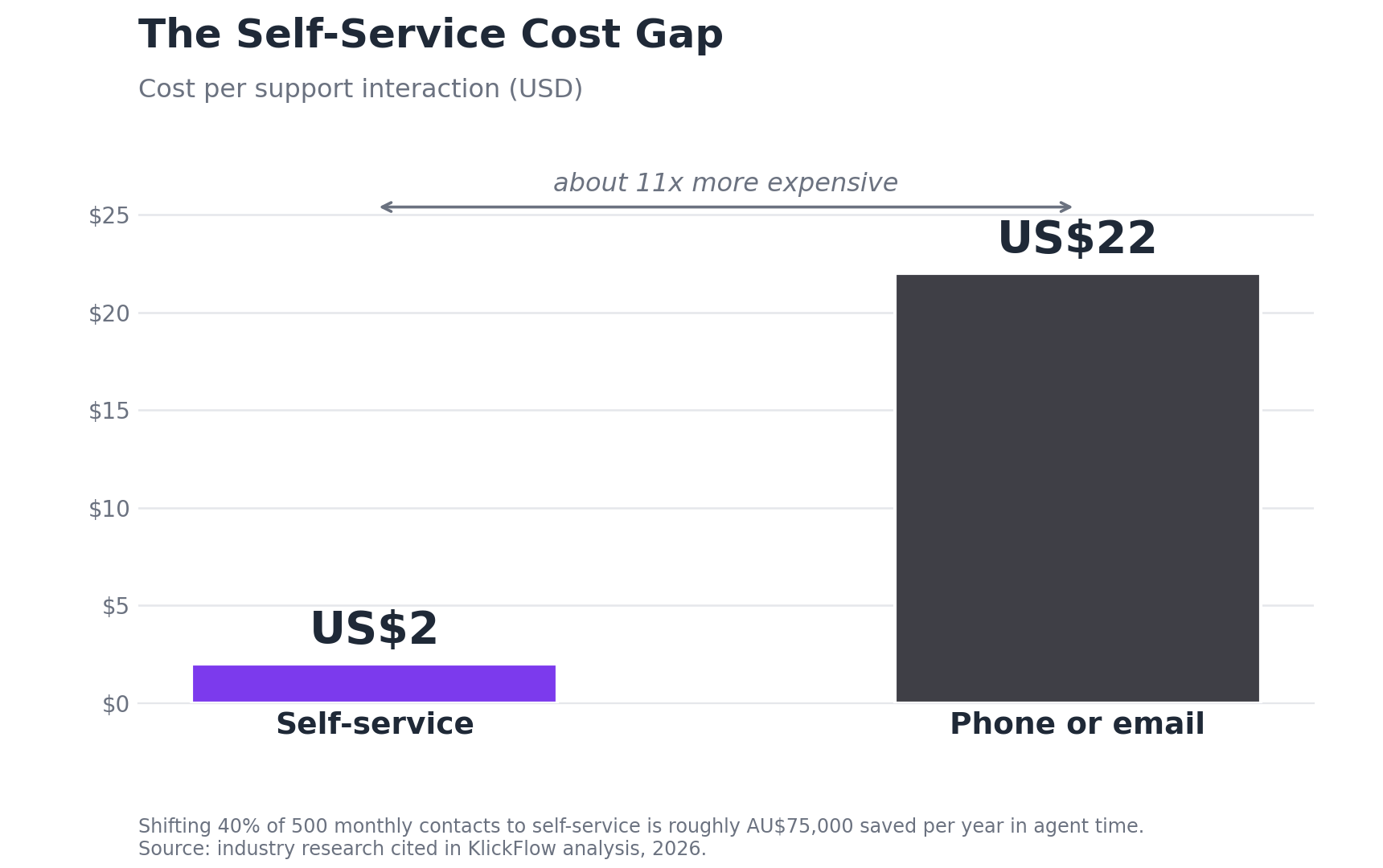
Self-service deflection is one of the highest-return investments an IT service desk can make. Industry data consistently shows that the cost per self-service interaction is approximately US$2, compared to US$22 for a phone or email contact. If 90% of your users are still calling or emailing for every request, your self-service portal is not working.
A portal that requires users to navigate a complex category tree, or that has a knowledge base nobody maintains, will not be used. User experience drives adoption. If the portal experience is worse than sending an email, users will send an email.
The self-service cost gap
Industry research consistently finds that a self-service interaction costs approximately US$2 compared to US$22 for a phone or email contact. For a team handling 500 contacts per month, shifting 40% to self-service represents an annual saving of roughly AU$75,000 in agent time alone.
Sign 4: Integrations Are Breaking or Simply Do Not Exist
Your service desk needs to connect to your monitoring tools, asset management system, HR platform, identity management system, and communication tools. Signs of outdated integration architecture include monitoring alerts that arrive in a separate inbox rather than creating tickets automatically, HR offboarding that requires IT to be notified by email, and access requests handled outside the platform.
According to OneIO's 2026 ITSM research, 44% of IT leaders identify data silos and disparate asset repositories as their biggest challenge in deploying ITSM solutions. In most cases, integration gaps are a platform capability issue rather than a configuration gap. A platform that cannot integrate natively with your HR system or monitoring tool requires custom development. That development has an ongoing maintenance cost that compounds over time.
Sign 5: Your Platform Costs Are Growing Faster Than the Value It Delivers
ITSM platform costs are not just the licence fee. They include the ongoing cost of administration, customisation, integration maintenance, external consultant fees, and the opportunity cost of team time consumed by platform limitations.
For ANZ organisations on legacy platforms, the total cost of ownership often exceeds what a modern mid-market platform would cost while delivering a fraction of the capability. The comparison worth making is not licence fee versus licence fee. It is total annual cost versus total annual cost of a modern replacement. That comparison often makes the migration decision straightforward.
Sign 6: Your Team Works Around the Platform Rather Than Through It
This is the most telling of all service desk platform migration signs and the hardest one to see from the inside. When agents have a messaging group where they triage priority incidents because the platform's notification system is unreliable, that is a workaround. When change approvals are collected via email because the change workflow is too cumbersome, that is a workaround.
Workarounds feel like team solutions. They are platform indictments. Ask your agents how they handle a priority one incident from start to finish. Count the steps that happen outside the platform. If there are more than two, you have a platform adoption problem that adding more configuration will not resolve.
Workarounds feel like team ingenuity. In practice, they are a record of every place the platform has failed the operation. The count of active workarounds is one of the most reliable diagnostics available to an IT leader.
Sign 7: Your Platform Has No AI Capability or Credible AI Roadmap
According to the 2026 State of AI in IT report by ITSM.tools and Atomicwork, 74% of organisations already have AI working inside at least one service management team, and 82% of those who have invested in AI report tangible results. If your current platform has no automated ticket routing, no AI-assisted knowledge recommendations, and no conversational self-service, your team is doing manually in 30 minutes what a modern platform does in 30 seconds.
Urgent note for Cherwell customers
Cherwell Service Management reaches end of life on 31 December 2026, after which Ivanti provides no further support, security patches, or updates. If your organisation is on Cherwell, migration planning should begin immediately. A structured migration for a mid-market organisation takes eight to twelve weeks minimum. Starting in Q4 2026 leaves insufficient time for a safe transition before the deadline.
Service Desk Platform Migration Signs: A Quick Diagnostic
| Question | Yes / No | Migration Signal Strength |
|---|---|---|
| Does making a configuration change require a specialist or vendor support? | High | |
| Is your performance reporting built manually outside the platform? | High | |
| Is your self-service portal adoption below 20% of contacts? | High | |
| Do you have integrations that require manual data bridging? | Medium | |
| Is your total platform cost growing without proportional improvement? | High | |
| Are your agents regularly working around the platform? | High | |
| Does your platform have no AI capability or credible AI roadmap? | Medium to High |
ITSM Platform Upgrade vs Replace: How to Make the Decision
Not every platform problem warrants a migration. The distinction between a configuration gap and a genuine capability limitation matters. The remedies are different and the costs are very different.
| Situation | Optimise | Replace |
|---|---|---|
| Platform has the capability you need but it is poorly configured | Yes | No |
| Core architecture supports your growth trajectory | Yes | No |
| Total cost of ownership is sustainable | Yes | No |
| Workarounds are process problems rather than platform limitations | Yes | No |
| Platform lacks capabilities standard in modern alternatives | No | Yes |
| Total cost of ownership exceeds a modern replacement | No | Yes |
| Routine changes require specialist administration | No | Yes |
| Three or more of the seven signs above apply | No | Yes |
What a Service Desk Migration Actually Looks Like in Practice
National Pharmacies managed customer support through email and spreadsheets before working with KlickFlow to migrate to Freshdesk. The existing approach had no structured ticket tracking, no visibility into resolution times, and no way to report on service performance consistently.
National Pharmacies: CX migration outcome
After migrating to Freshdesk with KlickFlow's support, National Pharmacies lifted CSAT to 88%. Agents handled 1.6x more tickets per agent with no new hires. Average ticket resolution time dropped to under half a day. The team now tracks 253 customer responses monthly with full visibility they never had before. The platform change was the enabler. The process design and adoption work was where the real improvement came from.
Our ITSM Platform Migration service covers this end to end for ANZ mid-market teams. For teams still deciding whether migration is the right call, our ITSM Platform Selection service provides a vendor-neutral evaluation framework before any commitment is made. You can also read our ITSM migration checklist for ANZ teams for the preparation steps that determine whether a migration succeeds or stalls.
Three or More Signs Apply to Your Current Platform?
If three or more of the seven signs above describe your current environment, the question is not whether to migrate. It is when and to what. KlickFlow works with mid-market ANZ IT teams to assess current platforms against these migration signals, model the three-year cost of staying versus migrating, and provide a clear recommendation with a migration roadmap if the case stacks up.
Book a free 30-minute diagnostic call. We will tell you what is broken, what is not, and what to fix first.
Frequently Asked Questions
How long does a service desk migration take for an ANZ mid-market organisation?
For a mid-market organisation of 200 to 500 employees, a structured migration covering data migration, process redesign, configuration, and training typically takes eight to twelve weeks from kick-off to go-live. Organisations with complex integrations, poor data quality, or large historical ticket volumes should plan for the upper end of that range or beyond.
What data should be migrated to the new platform?
Migrate all open tickets and the most recent twelve months of closed ticket history. User data, asset records, and knowledge base articles should all be migrated and cleaned during the process. Archive older historical data rather than migrating it. Delete duplicate or corrupted records before migration begins.
Should we redesign our processes during migration or replicate our current setup?
Redesign. Replicating your current configuration in a new platform moves your existing problems to a new tool. Migration is the opportunity to design processes correctly. The time spent on process design before configuration begins pays back immediately in adoption, usability, and reduced rework after go-live.
How do we minimise disruption during the migration?
Run both platforms in parallel for two to four weeks. Set a clear cutover date before go-live and communicate it to all staff. Invest in training before go-live rather than after. Assign change champions who can support peer adoption in the first two weeks. Have a documented rollback plan before cutover begins even if you never need to use it.
How do we know whether our platform needs optimisation or full replacement?
The key question is whether your platform has the capability you need but it is poorly configured, or whether the capability does not exist at all. Configuration gaps are fixable without replacement. Genuine capability limitations are not. Most ANZ mid-market teams discover that their gap is configuration rather than capability, which means optimisation delivers faster results at lower cost than migration.